

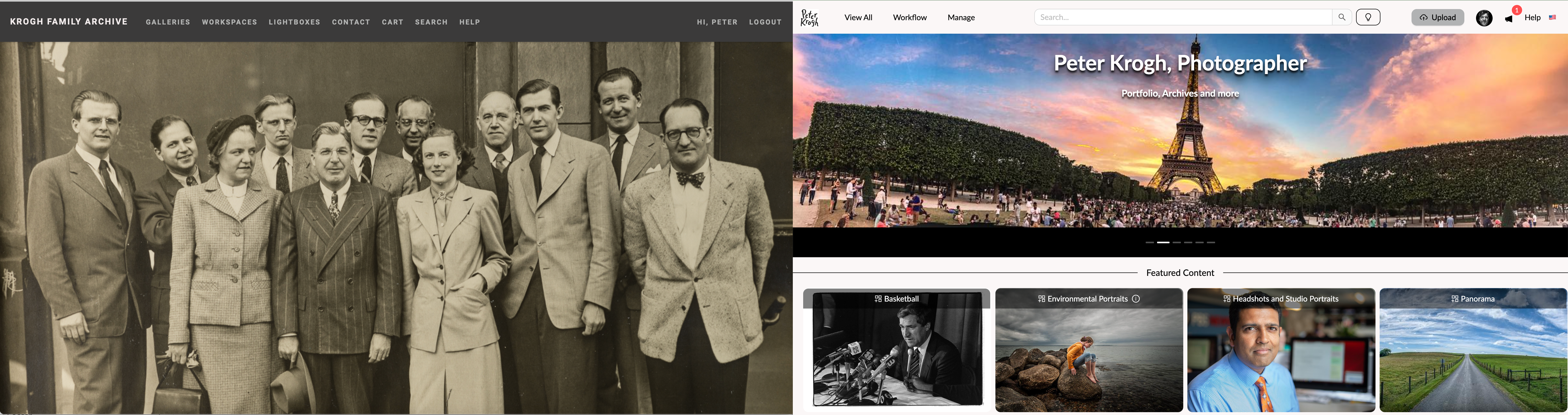
You can see some differences between Photoshelter (left) and Mediagraph right on the front page. Mediagraph allows for permission-based featured collections to help your teams find new content in the account.
Summary
PhotoShelter has long been a favorite of professional photographers for portfolios, stock photos, and assignment delivery. It handles these tasks well. However, our customers tell us that the Brands accounts fall short in a number of important ways. Listed below are the main issues our customers highlight, followed by a list of features found in Mediagraph which are missing from PhotoShelter for Brands.
Great Collaboration tools
Our Projects panel allows every member of your account to build and manage complex collaborative projects right inside the application. Build multi-step workflows, invite team members to collaborate, share internally or externally, even embed on other websites. Or, maybe, just make a nice collection of cat photos.
It's easier to find files
Mediagraph has unmatched capabilities to teach your members what's in the account. One example: we take the guesswork out of searching by displaying matching terms in the search box as you type.
You can actually tag efficiently
We have drag and drop tagging to the taxonomy tree, creator, rights packages and more. Find and clean up missing or incorrect metadata for thousands of files in a jiffy.
Partition the account for different departments or user groups
Even our lowest level account can be partitioned for true enterprise functionality. When your colleagues ask if they can have a little corner of the DAM for themselves, you can now say yes, without fear they will mess up your stuff.
Better file support
We are built for all the file types you use. Load up your multi-page PDFs, doc, Powerpoint and more. Search the full text and preview the files right in the DAM. Videos play in thumbnails, and the automatically-created transcripts are fully searchable in multiple ways. 3-D files? No problem.
Listed below are some of the features our clients love.
Account
- Transparent pricing
- Unlimited number of administrators
- Group-based management linking users, collections, and permissions
- Partitioned storage for each group
- Group administrators
- Featured collections on the front page
File Support
- Full-size image and video viewing, even for very large files
- Searchable, viewable support for multi-page doc, Excel, PPT, CSV, and PDF files
- Built-in image editor and video clipper
- Support for 3-D files
- Versioning for all file types
Metadata
- Drag and drop tagging
- Member-visible tag trees (taxonomy)
- Controlled vocabulary for people, events, products and general keywords
- Keyword visibility settings, definitions, and synonyms
- Geotagging and Map View
- Filterable rights management
- Fully-functional custom metadata fields
- Admin-configurable metadata import from Excel
- Full IPTC Extended metadata support
AI Support (EssentialAI plans and higher)
- Automatic Facial recognition
- Automatic OCR of all image files
- Automatic transcription of all videos
- Admin-visible auto keywording of all files
- Automatic sensitive content detection for images
Workflow
- Fully functional lightboxes with permission-based downloads and sharing, along with comment threads
- Configurable multi-step workflows with an approval widget
- Upload portals for every user group
- Integrated raw file processing with Lightroom Cloud
- Great Lightroom Classic integration
Free migration from Photoshelter for Brands
We can migrate your entire PhotoShelter for Brands media collection to Mediagraph while preserving all your collections, galleries and workspaces, along with the sequencing of the files. All of this can happen without any work from you other than giving us permission to access the account.
We can even do a trial migration so you can see your own material in Mediagraph. Book a demo to take a look at what a modern, full-featured DAM can do for your photos, videos, and other documents.